// Key Points at a Glance
What You’ll Take Away from This Article
- Insight: The German Federal Ministry of Finance (BMF) letter of 15 October 2026 names two accepted ways to deduct down payments in an e-invoice – via field BT-113 plus the free-text field BT-22, or via an attachment with an explicit reference.
- Benefit: Odoo 19 and 20 post down payments correctly and deduct them in the final invoice. VAT arises on receipt of payment, and the final invoice shows only the remaining VAT.
- Limitation: Odoo implements the deduction as negative invoice lines, not in BT-113 or BT-22. Whether that counts as an open deduction has not yet been confirmed for tax purposes – a checkpoint for every final invoice with a down payment.
Anyone posting down payments in Odoo Germany has had little room for error so far: down payment invoice with VAT, incoming payment, and later the final invoice in which Odoo deducts the down payment again. Since 15 October 2026 there is a new rule for this, and with the obligation to issue e-invoices from 2027 (initially for businesses with more than EUR 800,000 total turnover in the previous year, from 2028 for everyone) it will soon affect every final invoice. In its third letter on mandatory e-invoicing the German Federal Ministry of Finance (BMF) has defined how down payment and final invoices must look in the structured part of an XRechnung or ZUGFeRD file. The basics of the mandate are in our article on e-invoicing in Odoo.
The question customers have been asking us since: does the Odoo final invoice with a down payment still meet the German e-invoicing mandate?
The short answer: the posting is fine, the presentation in the e-invoice is a checkpoint. This article shows what the BMF requires, how Odoo 19 and 20 handle down payments, where the two worlds diverge, and what you can do until the open question is settled.
What the BMF rules on down payment and final invoices
VAT that was already shown on a down payment invoice must not be shown again on the final invoice. It has to be openly deducted there. That is nothing new – it has been in section 14.8 of the German VAT application decree (UStAE) for years. What is new is how this must be done in an e-invoice, where the XML counts rather than the PDF printout.
Until 30 June 2030, the tax authorities will not object to either of two approaches:
Option 1 – structured: The total of partial payments already received goes into field BT-113 (“Paid amount”). The details of the down payments (invoice number, date, net amount, VAT) go into the free-text field BT-22 (“Invoice note”).
Option 2 – attachment: The deduction is shown in an embedded, unstructured attachment that meets the requirements of section 14.8 para. 8 no. 2 UStAE. The structured part must explicitly refer to this attachment. This option already existed in the BMF letter of 15 October 2024, but only until the end of 2027.
There is also a transitional rule: e-invoices issued up to 31 December 2026 that only follow the earlier BMF guidance will not be objected to. Source: BMF letter of 15 October 2026 (BMF page with PDF download, in German).
How Odoo 19 and 20 post and deduct down payments
When it comes to posting, the result is right: the down payment invoice shows VAT, the final invoice only the remaining VAT. In the standard, Odoo posts the tax as early as the down payment invoice. Legally, however, it arises only when the payment is received. In our projects, the down payment module posts the tax on the date the payment comes in. Down payments received land on the designated account, and tax mapping in Odoo applies here too, so that tax rate and account match the service in question.
In the final invoice, Odoo deducts each down payment as a negative invoice line with VAT, labelled “Down Payment (ref: … on …)”. On the PDF this is perfectly readable. In the XML of the XRechnung or ZUGFeRD file, however, this happens: the negative lines go into the file as ordinary invoice lines. The tax totals (BG-23, BT-110) therefore show only the remaining VAT. So far, so good. But the two fields the BMF designates for option 1 stay empty or hold something else:
- BT-113 (“Paid amount”) is filled by Odoo with the difference between invoice total and amount due. That covers only payments reconciled directly with the final invoice itself. As a rule, it reads 0, not the sum of the down payments.
- BT-22 (“Invoice note”) contains the invoice note or payment terms and, where applicable, a withholding tax notice. The down payment details are not there.
Odoo 19 and 20 behave identically here; Odoo 17 and 18 fill BT-113 using the same logic. The BMF letter is newer than the Odoo code we reviewed, and Odoo has no automated test for exporting a final invoice with a down payment – only the down payment invoice itself is tested.
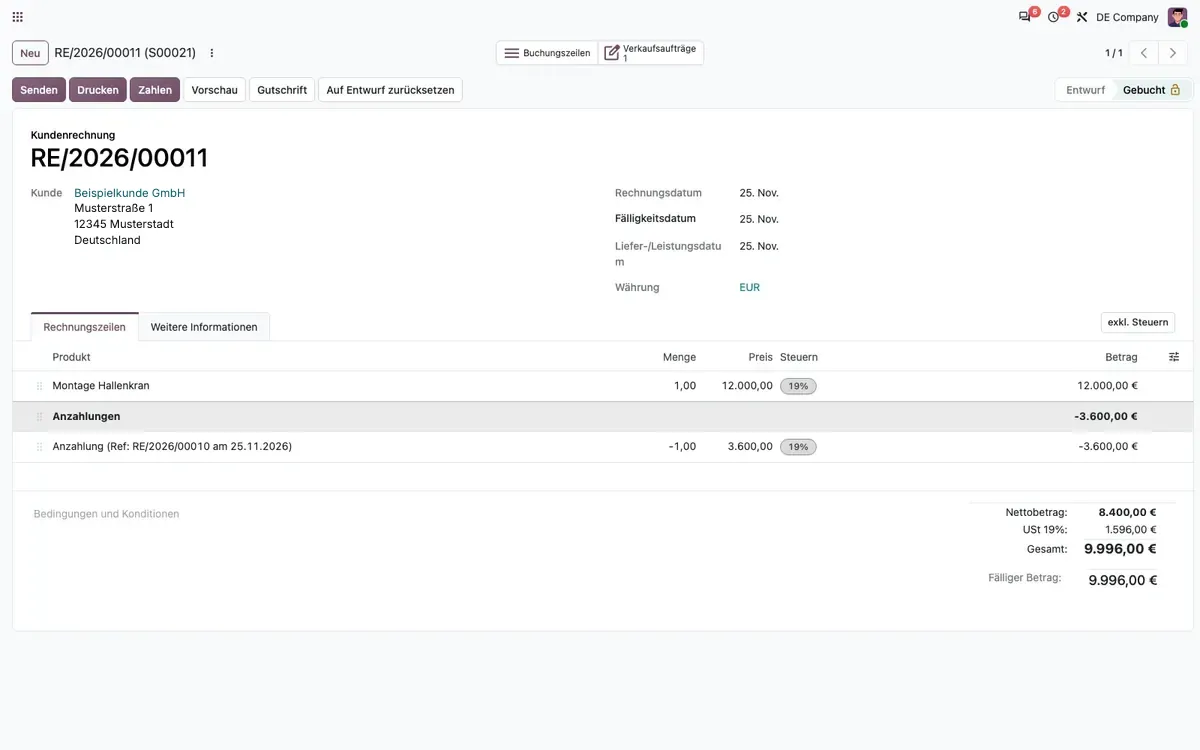
What the BMF allows and what Odoo delivers
Both BMF options can be set against the Odoo standard, and in both cases one building block is missing.
| // Requirement | Option 1: BT-113 + BT-22 | Option 2: attachment + reference | Odoo standard 19/20 |
|---|---|---|---|
| Total of down payments in the structured field BT-113 | required | not needed | usually 0 |
| Details per down payment (number, date, net, VAT) | in free text BT-22 | in the attachment | only as negative invoice lines |
| Explicit reference to the attachment | not needed | required, in the structured part | not set by the standard, possible via the invoice note (BT-22) |
| Tax totals show only the remaining VAT | yes | yes | yes (BG-23, BT-110) |
| Not objected to until | 30 June 2030 | 30 June 2030 | open – checkpoint |
So neither option is cleanly reflected in the e-invoice from Odoo – but that does not automatically mean the Odoo final invoice will be rejected. Whether the deduction via negative lines already qualifies as an open deduction under section 14.8 para. 8 UStAE is something the BMF letter does not say explicitly.
Handling down payments in Odoo safely until this is settled
You don’t need to change how down payments are posted. What you should check is how they appear in the final invoice. Three things help:
// Step by step
Three steps for final invoices with down payments
Open the XML of a final invoice with a down payment
Look at what is in BT-113 and BT-22 and whether the negative down payment lines are included. If you have only ever checked the e-invoice from Odoo as a PDF, this is the first time you see what the recipient actually reads by machine.
Prepare option 2
This works without touching the e-invoice export: the invoice report gets a payment overview listing each down payment (date, number, net amount, VAT) and the totals, as section 14.8 para. 8 UStAE requires for the attachment. The invoice note carries the explicit reference to that overview. Odoo writes the note into field BT-22, for XRechnung and ZUGFeRD alike. Not a full substitute for option 1, but a sensible interim step.
Option 1 as an extension
The clean route is an extension of the e-invoice export in Odoo: the negative down payment lines stay out of the XML, the tax totals carry the full consideration, BT-113 carries the gross down payments, and BT-22 lists number, date, net and VAT for each down payment. The posting in Odoo stays unchanged. We consider this the right route and have designed it as an extension.
Important in practice: this only concerns final invoices preceded by down payment invoices with separately stated VAT. If you receive a down payment as a plain payment without an invoice, there is nothing to deduct in the final invoice – but the VAT still has to be declared in the month the payment is received; how that works from Odoo is covered in ELSTER in Odoo 20.
In summary – down payments stay bookable in Odoo, the e-invoice needs a second look
Odoo posts down payments correctly, and the final invoice is right in total for tax purposes. What the BMF letter of 15 October 2026 changes is where the deduction has to sit: in the structured part of the e-invoice, or in an attachment that this part refers to. The Odoo standard in versions 19 and 20 delivers neither yet. Until it is settled whether negative lines are enough, the rule is: leave the posting, check the XML, add the presentation.
The transitional period until mid-2030 leaves time for a clean extension. We expect Odoo or the ecosystem to fill BT-113 correctly well before that deadline runs out. How we set up audit-ready accounting in Odoo is on our page accounting in Odoo; where e-invoicing sits in the bigger GoBD picture is covered in our overview Is Odoo GoBD-compliant?.