// Key Points at a Glance
What You’ll Take Away from This Article
- Insight: From Odoo 20, filing the German VAT return (UStVA) with ELSTER, the German tax authorities’ e-filing system, is built into the German localisation. One click on “Submit” sends the return to the tax office through an Odoo server, with no certificate and no password of your own.
- Benefit: Knowing this, you set the system parameter “l10n_de_reports.elster_proxy_mode = test” in every test and duplicate database before anyone clicks “Submit”. Otherwise, test systems file real returns.
- Limitation: The Odoo standard does not file corrected VAT returns or the EC sales list (Zusammenfassende Meldung, ZM). For those, for your own certificate and for flagged test submissions, the syscoon ELSTER module remains in charge.
Up to Odoo 19, Odoo ELSTER was a question of installation: companies that filed their VAT return through the syscoon ELSTER module with their own certificate simply left Odoo’s add-on module uninstalled. Odoo 20 changes that. Filing with ELSTER is now attached to the return type inside the German localisation, cannot be deselected and fires the moment you click “Submit”.
What does that mean for companies that want to file their German VAT return from Odoo in an audit-ready way?
This article is the Odoo 20 update of our ELSTER piece. You’ll learn how the new standard filing works, why the so-called test mode is not a test mode, what happens with corrections and the EC sales list, and where the syscoon ELSTER module closes the gaps.
What changes when you click “Submit” on the VAT return
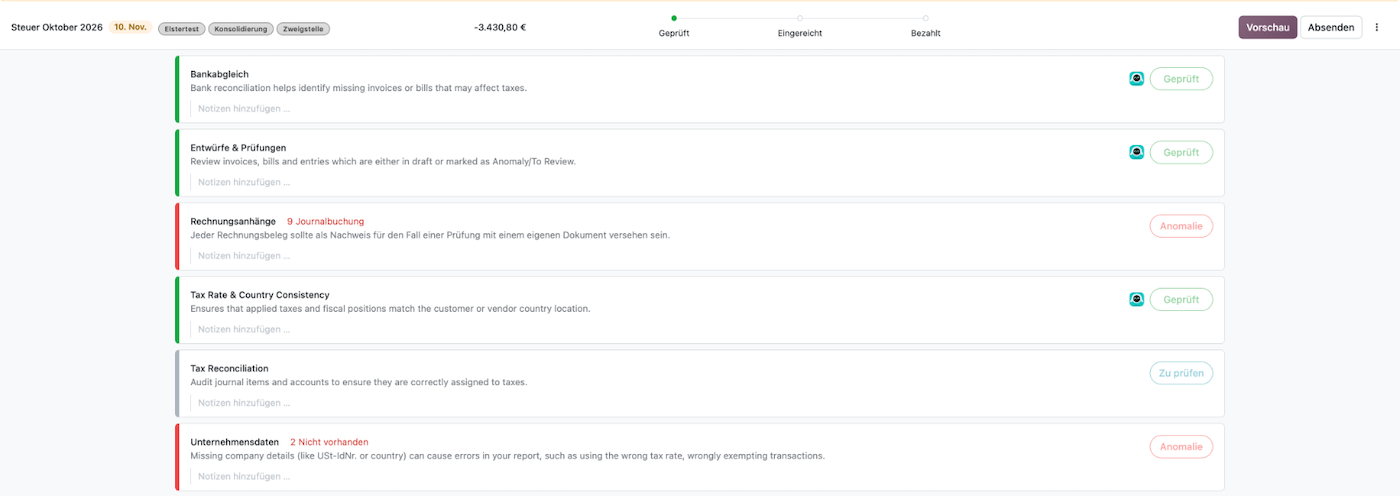
In Odoo 20, the “Submit” button is closing entry and filing in one. Up to version 19, ELSTER filing lived in a separate module you could install or not. In Odoo 20 it is part of the German localisation that comes with Accounting automatically.
Whoever clicks “Submit” straight away under Accounting › Tax Returns triggers three things at once: Odoo creates the VAT closing entry, sets the tax lock date and sends the return to the tax authorities through its own server. “Validate” alone creates the closing entry and sets the lock date; “Submit” validates if that has not happened yet, and then sends. Filing is based on the tax number alone. No ELSTER certificate of your own, no password, no internal approval step is required.
That is exactly where many finance teams pause. Everyone wants the closing entry and the lock date. Filing without an approval concept, not necessarily.
Why test databases file real returns
Odoo 20 does not distinguish between production and test databases when filing. A copy of the production database, created for training or for trying things out, uses the same production server for ELSTER filing by default. Click “Submit” there and you file a real VAT return under the real tax number.
The only switch against that is a system parameter: “l10n_de_reports.elster_proxy_mode” with the value “test”. With “test”, the return still goes to the Odoo server, but not as a real filing to the tax office. The parameter only applies to the database it is set in. A copy of the production database therefore starts with filing active again. There is currently no automatic switch-off for non-production systems in the standard.

Practical rule for every Odoo 20 system with German accounting: set the parameter before the first person sees the button. That applies to your own staging environment as much as to an implementation partner’s test database.
So the “test mode” is not a mode for trying out the filing. It is the off switch for real filing. A test submission with a test-case flag, acknowledged by the ERiC server as a test, is what the syscoon ELSTER module provides.
Corrected VAT return: portal upload or straight from Odoo
A corrected VAT return cannot be filed from the Odoo standard. If you find an error after submitting, say a wrongly mapped fiscal position or a late supplier invoice, you hit a media break. The alternative: generate the return’s XML file in Odoo, upload it in the ELSTER portal (“Formulardaten hochladen”) and set the correction flag there before filing.
That works, but it has two catches. First, the correction then lives outside Odoo, with no transmission log attached to the tax period. Second, it depends on one person with portal access and a certificate, not on the process in your accounting. How to avoid such errors in the first place is covered in our article on tax validation in Odoo.
With the syscoon ELSTER module, the corrected return stays in Odoo: you create a new form for the same period, the module recognises the existing filing, flags the new one as a corrected return (box 10) and files it through ERiC, with a password prompt and the server ticket stored in Odoo.
EC sales list: the export is not the filing
Odoo 20 does not file the EC sales list. The standard provides the EC sales report with the transaction types goods, services and triangulation, plus a CSV export. Filing with the Federal Central Tax Office (BZSt) remains manual work in the ELSTER portal.
The syscoon ELSTER module builds directly on the Odoo 20 EC sales report, generates the ZM in XML format and files it through ERiC, monthly or quarterly. Corrected ZM filings and the withdrawal of the monthly filing obligation are covered too, each with form status and log.
For companies with regular intra-EU supplies, that is the difference between a report you download and a filing you can prove has arrived.
Odoo standard or syscoon ELSTER module?
| // Feature | Odoo 20 standard | syscoon ELSTER module | ||
|---|---|---|---|---|
| File the VAT return | via Odoo server, tax number only | via ERiC, your own certificate | ||
| Corrected VAT return | XML upload in the ELSTER portal only | straight from Odoo, with log | ||
| EC sales list (ZM) | CSV export only, no filing | XML, filed via ERiC, corrections too | ||
| Test submission | “test” parameter switches off real filing | test case flagged, acknowledged by the ERiC server | ||
| Certificate and password | none, Odoo files as intermediary | own certificate, password per filing | ||
Both routes produce a valid VAT return. Only one maps the complete filing process in Odoo in an audit-ready way, including the cases that are guaranteed to come up during the year: corrections and the EC sales list.
In summary – Odoo 20 sends, syscoon files
Odoo 20 makes filing the German VAT return simpler and riskier at the same time: one click handles closing entry, lock date and filing, in every database that is not explicitly set to “test”. For a plain monthly rhythm, that is enough for many companies. As soon as a correction is due, an EC sales list is pending or filing should be tied to your own certificate and an approval concept, you need the syscoon ELSTER module, which also covers the German e-balance sheet via eBilanz+.
For every database that is not production: parameter first, button second. How to check VAT before the return is covered in our article on VAT checks before the German VAT return; how the return fits into the month-end close is on the Month-End Close & Reporting overview page.