// KEY TAKEAWAYS
What you will take away from this article
- Insight: Odoo needs no closing or opening entries for the month-end close. The balance sheet and P&L are calculated from the journal entries at any time. The close itself is about checking, accruing and locking.
- Benefit: If bank, open items, accruals and VAT are closed cleanly every month, management gets reporting it can rely on, and the year-end close becomes much easier.
- Limitation: Not everything is in standard Odoo. German requirements such as fixed asset and provision schedules, the E-Bilanz or statutory consolidation need modules or specialist software.
Month-end close in Odoo has a worse reputation than it deserves. In many finance teams it drags on for weeks, even though all the data is already in the system. The tool is rarely the problem. What is usually missing is a fixed sequence: who reconciles the bank, when are accruals posted, who signs off the VAT, and when is the month closed?
What belongs to the month-end close in Odoo – and what doesn't?
This overview covers the building blocks, what changes when your company has a German entity, and the reporting you end up with. Each building block links to an article that goes deeper.
What is the month-end close, and how does it work in Odoo?
The month-end close makes sure a month's figures are complete, correct and final.
It is the little sibling of the year-end close: not a legal deadline, but the basis for everything that follows. The German VAT return, monthly management reporting, cash planning and, eventually, the annual financial statements all rely on months that have been closed properly.
Odoo handles this differently from traditional accounting software. It needs no closing or opening entries. The balance sheet and P&L are calculated from all journal items at any time. The date filter sets the period, and the account type determines whether an account is shown cumulatively or for the period only.
For the month-end close, this means there is no button that "closes" the month. A month is closed when everything is posted and checked and the period is locked. How Odoo handles the previous year's result is explained in our article on retained earnings in Odoo.
Month-end close in Odoo: the building blocks
The close runs faster when every building block has a fixed place and a named owner.
The sequence follows a simple logic: first the data has to be complete, then it is checked and adjusted, and finally the period is locked and reported.
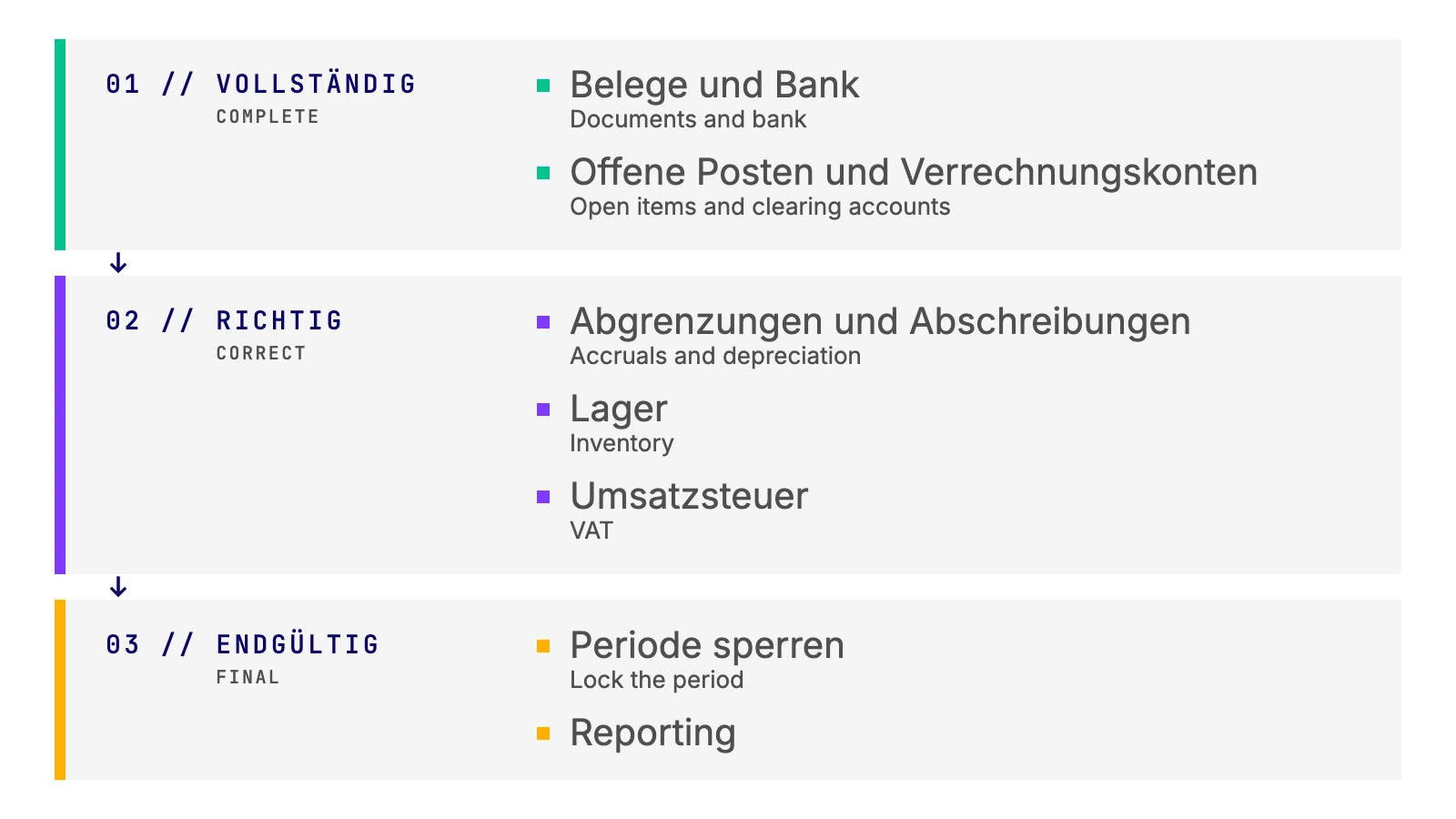
- Documents and bank: All incoming and outgoing invoices are recorded and the bank accounts are reconciled up to month-end. If items stay open in the bank reconciliation, everything else stalls.
- Open items and clearing accounts: Receivables and payables are matched, and suspense and clearing accounts, for payment providers or payroll for example, are at zero or explained.
- Accruals and depreciation: Expenses and revenue sit in the right month. Odoo can spread invoice lines with a start and end date across the months automatically. The asset management posts depreciation according to plan, so at month-end you only check that everything has been posted.
- Inventory: With automated inventory valuation, Odoo posts stock moves directly to accounting. At month-end you reconcile the stock valuation with the inventory account. How Odoo values stock is covered in our article on the new inventory valuation features in Odoo 18.
- VAT: Check the tax entries, prepare the VAT return and submit it.
- Lock the period: The month is closed to further postings.
- Reporting: P&L, balance sheet, management reports and KPIs go to management.
Three of these building blocks deserve a closer look, because that is where German requirements make the difference: VAT, locking and reporting.
Check VAT before the return goes out
Errors in tax mapping are caught either during the month-end close or later in a tax audit.
Odoo derives VAT from tax rates, tax mappings and fiscal positions. This works reliably as long as the master data is right. A wrongly set-up customer or a product with the wrong type is enough to put an entry in the wrong line of the German VAT return (Umsatzsteuer-Voranmeldung, UStVA).
That is why every VAT return should be preceded by a short check of the tax-relevant entries. Four combinations are worth a look:
- Account and tax rate: Does the tax rate match the revenue or expense account?
- Tax rate and country: An intra-community supply to a customer in Switzerland is a contradiction.
- Tax rate and product type: An intra-community supply of "consulting" points to a product with the wrong type.
- Triangular transactions: They need their own flag and easily slip through without a check.
How to set this check up as a fixed step in Odoo is explained in our article on checking VAT before the VAT return. Why small errors in tax determination have big consequences is covered in the article on tax validation in Odoo. Once everything is checked, the syscoon ELSTER Package submits the return via ERiC directly from Odoo to the tax office. ELSTER is the German tax authorities' e-filing system.
When is the month locked in Odoo?
Only the lock turns "fully posted" into a closed month.
As long as a period is open, every entry in it can still be changed or added to. For reporting, that is a risk: the figures management received yesterday may no longer be correct today.
Since Odoo 18 there are several lock dates for this. Sales and purchases can be locked separately. Odoo sets the tax return lock automatically as soon as the VAT closing entry is posted. A global lock closes all entries up to a date, and a hard lock cannot be lifted at all.
A good rule of thumb is to lock the month after the VAT return and to set the hard lock only once a period is truly closed, for example after the year-end close.
This also matters for the GoBD, the German principles for keeping digital accounting records: posted data must not be changed unnoticed after the close. Which locks you set and when therefore belongs in your process documentation (Verfahrensdokumentation).
Reporting in Odoo: from the BWA to cash flow
Reporting is not an extra step after the close. It is its result.
Teams coming from DATEV, the accounting software widely used by German tax advisors, usually ask for the BWA in their first month. The BWA (betriebswirtschaftliche Auswertung) is a DATEV-style management P&L, not a legally defined report, and it looks different depending on the system and the advisor. Why that is, and why it still matters, is explained in our article on why the BWA is often misunderstood.
In Odoo, you build such reports yourself. Reports for P&L, balance sheet and KPIs can be structured freely, and accounts are assigned to report lines via account tags. Because the reports are linked directly to the journal entries, there is no export and no second set of data. Revenue can also be broken down by customer or product, not just by account.
For balance sheet items, the balance alone is often not enough. If you want to know how fixed assets, provisions, equity or loans moved during the month, you need movement types such as additions, disposals, depreciation or repayments. They produce the schedules for assets, provisions, equity and loans, and with the "Indirect Cash Flow" module a cash flow statement as well. How this works in Odoo is shown in our article on movement types in accounting.
And equity? Odoo calculates retained earnings automatically in the report instead of reposting them at year-end. Which options exist and which one we recommend is covered in the article on retained earnings in Odoo.
Multiple entities: management or statutory consolidation?
If you run several companies in Odoo, you need to know what standard consolidation is good for.
Since Odoo 18, consolidation is part of the Accounting app. The companies' charts of accounts are mapped to each other, the values are added up and shown in the currency of the active company. Intercompany entries are left out rather than eliminated.
// COMPARISON
Management consolidation
For a group's internal monthly reporting, standard Odoo is usually enough. Management sees revenue, costs and results of all companies at a glance, in one main currency.
Statutory consolidation
For the legally required consolidated financial statements, the standard falls short: currency differences are not recorded in equity, there are no group-level adjustment entries and there is no true consolidated balance sheet.
Both work with the same entries, but only one replaces the consolidated financial statements. Where exactly the limits are is explained in our article on management versus statutory consolidation in Odoo v18. If you need statutory consolidation directly in Odoo, we implement it fully integrated for our clients.
From month-end to year-end close
Twelve cleanly closed months are half the work of the year-end close.
If every month is reconciled and locked, what remains at year-end are the actual closing topics: valuations, provisions and alignment with your tax advisor. Hunting for errors from spring is no longer necessary.
The handover gets easier, too. With the eBilanz+ interface, the trial balance goes from Odoo to eBilanz+ without an Excel export. There, the E-Bilanz, the electronic submission of the annual financial statements to the German tax office, is checked, completed and submitted. Publication in the German company register runs in the same workflow. The submitted documents come back to Odoo and are archived there in line with the GoBD. More in our article on the eBilanz+ interface.
You prepare the annual financial statements under the German Commercial Code (HGB) with your tax advisor as usual. We make sure the figures arrive there cleanly from Odoo and work hand in hand with your advisor.
Conclusion: month-end close in Odoo is a routine, not a project
Odoo takes a lot of work out of the month-end close. Closing entries are not needed, accruals and depreciation run automatically and reports are linked directly to the journal entries. What remains is discipline in the sequence and an eye on German requirements: the VAT check before the return, a clear rule for locking and reporting that goes beyond the BWA. Do it the same way every month and you will notice at the latest during the year-end close. Next, we look at what audit-ready accounting in Odoo means in practice and what the GoBD require.
Month-end close & reporting in the Purple Finance Blog
- Types of transactions in accounting and their significance for financial statements
- The eBilanz+ Interface: German Year-End Closing From Odoo
- Profit Carryforward in Odoo: How the Calculation Works
- Why the BWA Report Is Often Misunderstood
- Checking VAT Before the German VAT Return in Odoo
- Management or Statutory Consolidation in Odoo v18?